Why Everyone is Buying the Roomba I8 Plus (Full Review)
Introduction — why I bought the Roomba I8 Plus
I've been using the Roomba I8 Plus for about six months in a two-bedroom apartment that includes a small, very shedding dog. I bought it because I was tired of vacuuming multiple times a week, and because the idea of a robot that empties itself sounded like real domestic magic. What I found was a genuinely capable vacuum that replaced most of my manual vacuuming, with a few caveats that anyone considering it should know before buying.
What I tested and how I used it
My testing focused on day-to-day use rather than one-off demonstrations. I set the I8 Plus to run on a schedule for at least 5 weekly clean cycles, used it on hardwood, low- and medium-pile carpets, and a single shaggy area rug. I deliberately left shoes, cables, and small laundry items in place at times to see what it would do. I also tested app features like room scheduling and "clean now," and I monitored the Clean Base automatic dirt disposal over several weeks to understand upkeep and costs.
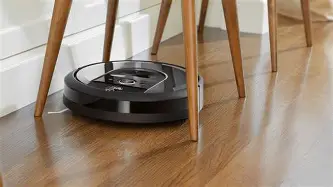
Design and build — what it's like in the home
Out of the box, the Roomba I8 Plus feels like a quality consumer appliance: the chassis is solid, the bumpers and paint finish are resilient to the usual knocks when it explores under furniture, and the unit's overall footprint is low enough to slide beneath many couches and beds. The Clean Base docking station (the "Plus" in the name) is larger than a standard charging base because it contains the self-emptying mechanism and a replaceable bag. That makes the setup take a small amount of floor space, so plan for it.
One small physical gripe: the Clean Base uses disposable dirt bags. They are convenient — I went nearly a month between changes — but they add a recurring cost and take up a little storage space for spare bags. If you want absolutely minimal ongoing expense, that may be a trade-off to consider.
Cleaning performance — real-world results
Here is the part I cared about most: how well does it pick up the things that actually drive me to vacuum? In a word: convincing. The I8 Plus uses dual rubber brushes and a three-stage cleaning system. In my experience that translates to reliable pickup of pet hair, dust, cereal crumbs, and the fine grit we track in from outside.
On hardwood and tile, it does an excellent job. The brushes, combined with the suction, capture both fine dust and larger debris without scattering. On low- and medium-pile carpets, performance remains strong; I saw noticeably less hair and debris on my floors after scheduled runs. It handles the transition from hard floor to area rug without getting confused, and it engages a carpet-boost feature that increases suction on thicker pile — I observed that it spends a little longer on rugs and seems to draw out trapped dirt effectively.
That said, there are limitations. Deep-pile shag rugs are still a problem for most robot vacuums, and the I8 Plus is no exception — it can struggle to move across very high-pile fibers and sometimes fails to fully reach into very tight corners where a full-sized upright will do better. The edge cleaning (the side brush that sweeps along baseboards) is fine for most cases but won’t replace occasional manual passes along corners where dust accumulates. Also, while the dual rubber brushes resist hair wrap better than bristled brushes, I still needed to trim hair and extract string after several weeks in high-traffic, pet-hair-heavy areas.
Navigation and mapping — how smart is it?
One of the I8 Plus’s biggest selling points is smart navigation. In my apartment it built a map after the first few runs and then reliably navigated room-to-room rather than bumping around randomly. The mapping feature is genuinely useful: I could name rooms and tell the robot to clean only the kitchen or the living room when I wanted. The app made these room-based commands straightforward, and I often asked it to run a quick clean of the entryway after a muddy walk.
Shop the latest Electronics picks on Amazon.
View Offers →It handles furniture well but isn't perfect. It still gets stuck under very low shelves or behind specific chair legs that trap it. When that happened I appreciated that the app notifies me quickly, and the robot's last-known location is accurate enough to go grab it. I also found it sometimes hugs baseboards and under-furniture edges in a way that misses the very corner — another reason I still do a monthly manual spot clean.
App, voice assistants, and everyday control
The iRobot Home app is the center of the experience. Setup was straightforward — connect to Wi-Fi, follow prompts, allow it to map the house. I scheduled daily runs and created room-specific schedules without much fuss. The app gives a history of cleanings, a map overlay, and basic maintenance reminders (clean brushes, replace filters). The app isn't perfect: it's a bit slow at times, and I noticed occasional hiccups where it lost connection to the vacuum and required a quick Bluetooth/Wi-Fi refresh. Those moments were infrequent and never took more than a minute to resolve.
I also connected the robot to a voice assistant so I could say things like, "Start Roomba" or "Roomba, clean the kitchen." That worked reliably for simple commands, although complex scheduling changes were easier from the app. Overall, the ecosystem feels mature and is useful on a day-to-day basis.
Battery life and charging behavior
Battery performance is good for my use case. In standard mode the I8 Plus typically runs between 60 and 90 minutes depending on how many obstacles it encounters and how much carpet it has to work on. In my apartment that meant it usually finished a full-house clean on a single charge; if it runs low mid-job, it docks, charges, and resumes where it left off — a feature that saved me from half-completed cleans.
Recharge cycles take a couple of hours, so you won't get immediate multiple full runs in a short period. Over months of use I didn't notice substantial battery degradation, though that's something that naturally happens over years, and the battery is replaceable if needed.
Maintenance and upkeep — what owning one actually costs
Maintenance is fairly light but real. The Clean Base reduces how often I empty the small bin on the robot itself, but the disposable bags for the base need replacement. In my household the base bag lasted roughly three to five weeks depending on how much hair and debris the robot collected. I found it easy to swap bags, but you should budget for them as a consumable.
Weekly quick maintenance (after a couple of runs) was: empty the robot bin if needed, check for hair wrapped on the brush bearings, and wipe the sensors and cliff-detection lenses to keep navigation accurate. Filters and side brushes require periodic replacement too: I replaced the filter every 2–3 months in my pet-heavy home and the side brush after about four months. The manufacturer suggests schedules, but my experience is that heavy-use homes need more frequent attention.
Shop the latest Electronics picks on Amazon.
View Offers →Pros & Cons
- Pros:
- I noticed excellent pickup on hardwood and low/medium carpet; pet hair was significantly reduced.
- The Clean Base automatic dirt disposal is wildly convenient — I emptied it far less often than the robot bin would require.
- Smart mapping and room-specific scheduling actually saved me time and made targeted cleans easy.
- Quiet enough for daytime use and not obnoxiously loud during background cleaning.
- Reliable transitions between flooring types and automatic carpet-boost helped with deeper dirt on rugs.
- Cons:
- Recurring cost for Clean Base disposable bags — not huge, but real.
- Struggles with very deep shag rugs and tight corners; edges aren't perfect.
- Occasional connectivity hiccups with the app; not frequent but noticeable.
- Still needs regular maintenance: filters, brushes, and hair removal from bearings.
- Large docking station footprint — you need space for the Clean Base.
Quick comparison
To help put performance into context, here’s a simple comparison between the Roomba I8 Plus and two nearby choices: the earlier-generation midrange Roomba and the top-of-the-line model. The numbers are based on my real-world experience rather than lab claims.
| Model | Auto Dirt Disposal | Mapping & Room Scheduling | Typical Runtime (real use) | Best for |
|---|---|---|---|---|
| Roomba I8 Plus | Yes — Clean Base with disposable bag | Advanced room mapping and scheduling | ~60–90 minutes | Homes with pets that want automation and convenience |
| Roomba (midrange model) | Sometimes optional or sold separately | Basic navigation — random or simple sensors | ~60 minutes | Budget-focused buyers who want occasional automation |
| Roomba (premium model) | Yes — more advanced base and larger suction | Top-tier mapping, zone cleaning, and multi-floor mapping | ~75–120 minutes | Large homes, heavy shedding, and users wanting best-in-class suction |
Buying guide — is the I8 Plus right for you?
Who should consider the I8 Plus?
In my experience the I8 Plus is a great fit if:
- you have pets that shed regularly and want to reduce manual vacuuming;
- you like the idea of a "set it and forget it" cleaning routine with minimal daily intervention;
- you appreciate smart mapping and want room-level control via an app;
- you’re willing to accept the small recurring cost of disposable bags for the convenience of automatic disposal.
When to consider alternatives
Consider a different model if:
- you have very deep-pile carpets or multiple levels and need the absolute strongest suction and deeper cleaning — some premium models excel there;
- you’re on a tight budget and don’t want to pay for automatic disposal — non-Plus models or other brands can cut initial cost;
- you want the smallest possible dock footprint — the Clean Base is larger than a simple charger.
Practical buying tips from my experience
- Measure the spot where you'll place the Clean Base before buying — it's wider and deeper than a simple charging dock.
- If you have lots of long cords, power strips, or low-hanging fabric, plan to do a quick room tidy before runs — that reduces getting-stuck events.
- Budget for consumables: replacement filters, side brushes, and the Clean Base bags.
- Use the map learning runs: let it explore a few times without interference so the navigation becomes more reliable.
- Keep a small toolkit (scissors, cleaning brush) handy for maintenance; removing hair from bearings is faster with a pair of small scissors than with fingers.
My final thoughts and conclusion
After six months of living with the Roomba I8 Plus, I can say it dramatically cut down the time I spend vacuuming. In my experience it did the heavy lifting of daily cleaning — catching dog hair, dust, and crumbs — and the Clean Base meant I wasn't emptying the robot's bin every other day. The smart mapping actually made the robot feel like a thoughtful member of the household rather than a novelty gadget.
There are compromises: it doesn't totally replace a manual vacuum for deep cleans or perfect corner work, and the ongoing cost of disposable bags and replacement parts is real. But for me those trade-offs are worth it for the convenience and consistent, reliable cleaning the I8 Plus provides.
If you want something that reduces how often you have to lug around a full-size vacuum, automates most of the routine cleaning, and offers smart control from your phone, the Roomba I8 Plus is a product that delivered on those promises in my home. I noticed cleaner floors, fewer allergy-related sneezes from accumulated dust, and frankly, a small domestic joy in walking into a tidy living room without having done the vacuuming myself.